> For the complete documentation index, see [llms.txt](https://bxorm.ortusbooks.com/llms.txt). Markdown versions of documentation pages are available by appending `.md` to page URLs; this page is available as [Markdown](https://bxorm.ortusbooks.com/getting-started/configuration/secondary-caches.md).
# Secondary Caches
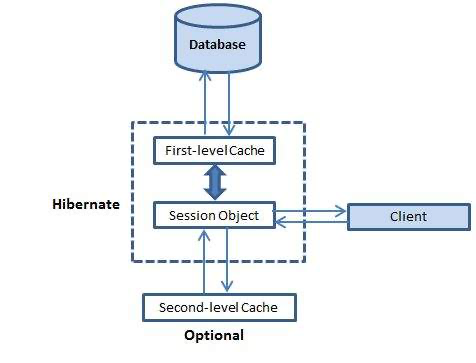
Hibernate's secondary cache is a powerful tool that can greatly improve the performance of your application. By storing frequently accessed data in memory, the secondary cache can reduce the number of database queries that need to be made, resulting in faster response times and more efficient use of system resources. Whether you're working on a small project or a large enterprise application, the secondary cache is an essential part of any Hibernate-based system. So if you want to get the most out of your Hibernate application, take advantage of this powerful caching feature!
Please see the [caching section](/usage/caching.md) for all the wonderful caching strategies you can do with Hibernate.
### Configuration
A secondary cache provider is a class that manages a level of caching secondary to Hibernate's main caching context - the Hibernate session. A secondary cache enables longer-running cache contexts, more fine-grained control over cache busting, and other performance-related benefits.
The only setting necessary to enable secondary caching is the `secondaryCacheEnabled` setting:
```js
this.ormSettings = {
secondaryCacheEnabled : true
};
```
To configure the caching, specify the path to an XML cache configuration file in `cacheConfig`:
```js
this.ormSettings = {
secondaryCacheEnabled: true,
cacheConfig : "./config/ehcache.xml"
};
```
This `ehcache.xml` cache configuration then should look something like this:
```xml
```
### How the Cache Provider Setting Works
bx-orm bridges Hibernate's JCache (JSR-107) SPI to BoxLang's own `CacheService`, so `cacheProvider` selects a **BoxLang cache provider by name** rather than a specific Hibernate/EHCache implementation:
```js
this.ormSettings = {
secondaryCacheEnabled : true,
// use the "userCache" provider registered in your CacheBox/CacheService config
cacheProvider : "userCache"
};
```
* The default, `"BoxCacheProvider"`, uses BoxLang's built-in in-memory cache.
* `"ConcurrentHashMap"` and `"HashTable"` are legacy aliases kept for CFML/Lucee compatibility; both simply resolve to the default BoxLang cache provider.
* Any other value must be the name of a cache provider already registered with BoxLang's `CacheService` (e.g. via CacheBox). If no provider with that name is found, ORM startup throws an error.
* `cacheConfigProperties` lets you pass secondary-cache settings as a BoxLang struct instead of (or alongside) an XML `cacheConfig` file.
See the [Caching](/usage/caching.md) page for entity-level cache strategies (`cacheUse`).
---
# Agent Instructions
This documentation is published with GitBook. GitBook is the documentation platform designed so that both humans and AI agents can read, navigate, and reason over technical content effectively. Learn more at gitbook.com.
## Querying This Documentation
If you need additional information that is not directly available in this page, you can query the documentation by asking a question.
Perform an HTTP GET request on the following URL with the `ask` and `goal` query parameters:
```
GET https://bxorm.ortusbooks.com/getting-started/configuration/secondary-caches.md?ask=&goal=
```
`ask` is the immediate question: it should be specific, self-contained, and written in natural language.
`goal` is what the user is ultimately trying to achieve, the reason they need the answer. Sharing it helps GitBook give you a better, more relevant answer. A goal is most helpful when it describes the outcome the user wants rather than restating the question. For example, with `ask=how do I create an API token`, a goal like `automate deployments from our CI pipeline` lets GitBook tailor the answer to that use case.
The response will contain a direct answer to the question and relevant excerpts and sources from the documentation.
Use this mechanism when the answer is not explicitly present in the current page, you need clarification or additional context, or you want to retrieve related documentation sections.